
Edit with a sentence
Type what you want changed and get a new version of the image.
Edit any image on your page with a sentence. Change the whole picture, or paint over the part you want fixed.
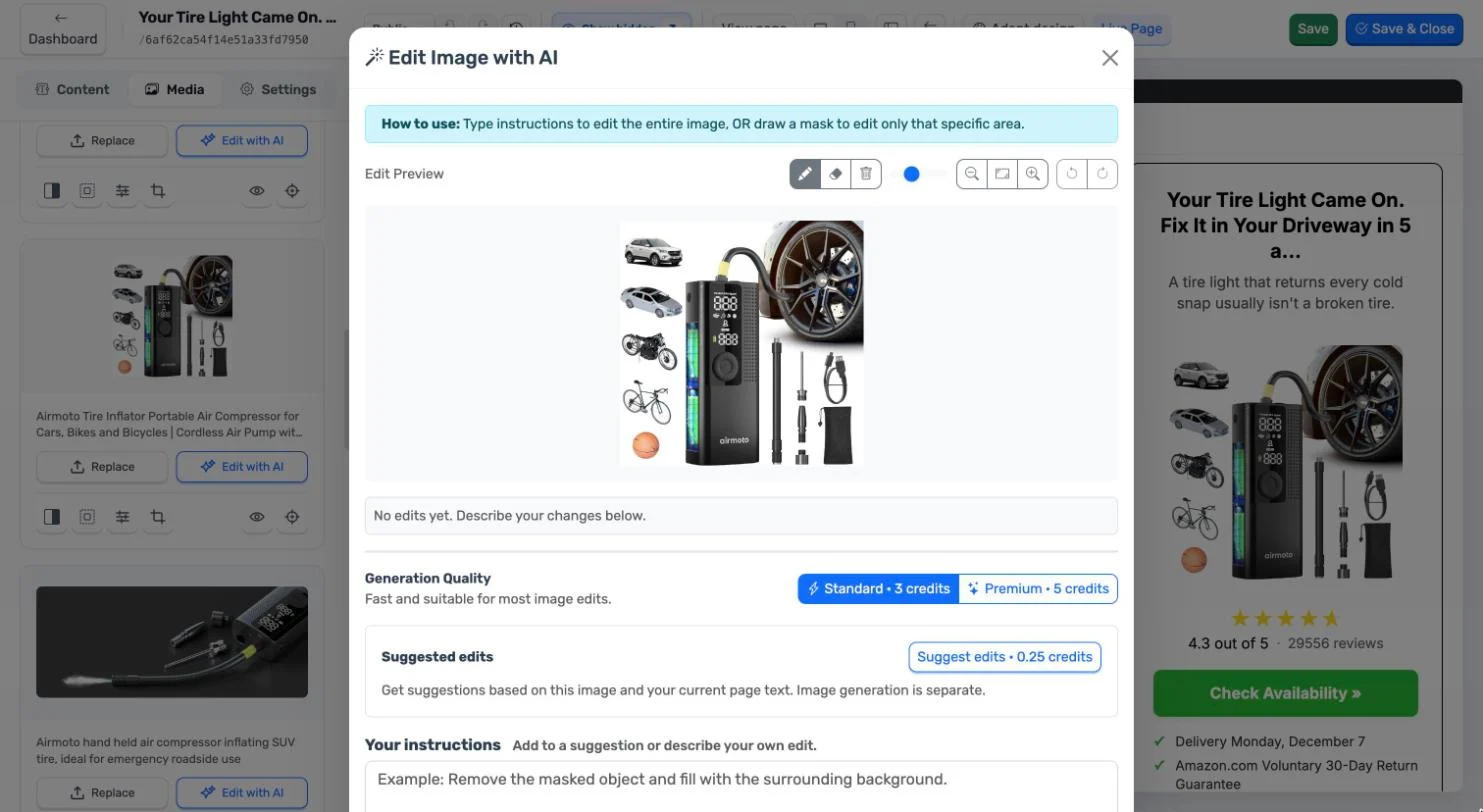
Type what you want changed and get a new version of the image.
Paint over a part of the image to change only that, and leave the rest alone.
Ask for edit suggestions based on the image and the text of your page.
Choose the quality each time you generate. You see the result before anything changes on your page.
If a generation fails, the credits are returned.
In the editor, choose Edit with AI on any image of the page.
Write the instruction or pick a suggestion, and mask an area if you need to.
Generate, check the result and apply it to your page.
AI editing works on an image that is already on your page: a product photo, a hero image, a portrait.
Replace any image with an upload, a file from your library or a link, and crop it to fit.
Not today. It edits an image that is already on the page. To bring in a new one, upload it or import it from a link, then edit it.
3 credits on Standard and 5 on Premium. Asking for suggestions costs 0.25 credits.
Nothing changes on your page until you apply the image. You can try again with a different instruction; each generation is charged.
Image editing lives in the page editor. In the Studio you choose which images the page uses.