Your Facebook ad gets clicks. People land on your product page. They look at the price, scroll a bit, and leave.
One possibility is that the visitor wasn't ready. Also check the offer, audience, loading speed and checkout before adding another page. They saw a 15-second video in their feed, tapped out of curiosity, and landed on a page built for people who already want to buy.
A presell funnel adds one step in between: an advertorial. It's an article-style page that explains the problem, introduces the product, answers doubts, and then sends the reader to your Shopify product page.
This guide shows you how to build one, how to connect it to your ad, and how to test whether it actually beats sending traffic straight to the product page. Sometimes it won't. We'll cover that too.
How the ad, the advertorial and the product page fit together
Think of the funnel as an ad and two pages with different jobs:
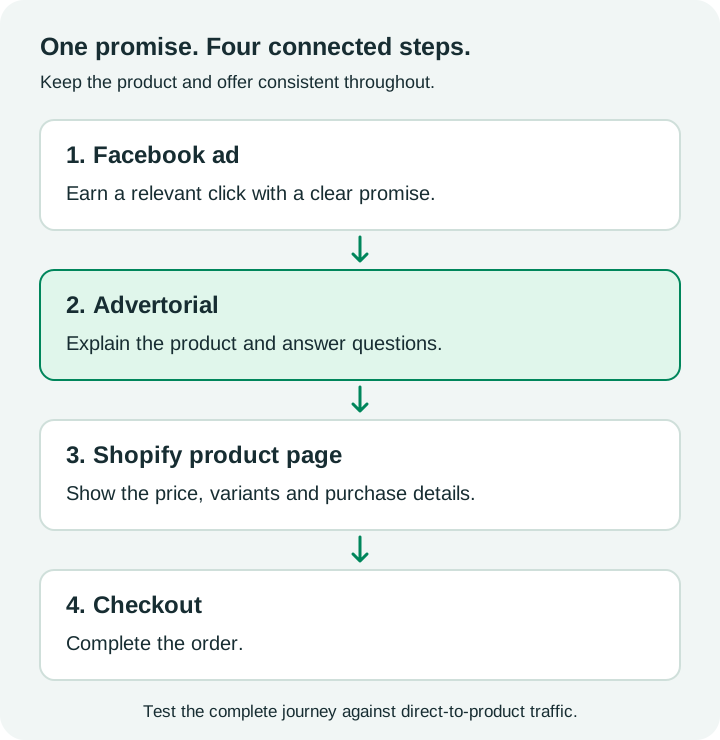
The ad has one job: get the right person to click. It makes a promise or opens a question.
The advertorial keeps that promise. It explains the problem, why common fixes fail, and why this product is different. It's where the actual selling happens.
The product page (PDP) closes. Price, variants, shipping, returns, reviews, the Add to Cart button. By the time someone gets here, they should already be mostly convinced.
A product page can educate and persuade too. An advertorial gives you a separate place to develop one campaign angle, but that extra step needs to earn its place in the funnel.
If you want a deeper look at how advertorials work on Shopify specifically, see our guide to Shopify advertorials.
A quick demo
To keep things concrete, we'll use a made-up product through this guide: an adjustable-fill pillow. The product, copy and numbers below are a constructed demo, not a real brand or real results.
- Ad: a product demonstration video. "Watch how removing filling changes this pillow's height."
- Advertorial: "What to Check Before Buying an Adjustable Pillow"
- PDP: the pillow, with sizes, price, a trial period and reviews.
Match the ad promise in the first screen
When someone clicks your ad, they carry an expectation. If the first screen of your advertorial doesn't match it, they bounce. They'll think they clicked the wrong thing.
So the top of the page needs to echo the ad. Same problem, same angle, ideally similar words.
Ad says: "Watch how removing filling changes this pillow's height." Weak advertorial headline: "Introducing the CloudNeck Pro: Premium Sleep Technology" Better headline: "How Adjustable Filling Changes Your Pillow Setup"
The better version keeps talking about the reader's problem. The product can wait a few paragraphs.
A few rules for the first screen:
- Headline matches the ad's hook. If your ad shows adjustable filling, explain that adjustment before introducing other features.
- Subheadline tells them what they'll get. "How to adjust the filling, check the dimensions and compare care instructions."
- Use a relevant image. Someone in the situation your ad described, not a product shot on white.
- Keep it readable on a phone. Use short paragraphs, readable text and a compact header. Check the page on a phone as well as a desktop.
If you run several ad angles, build one advertorial opening per angle. One angle per page is easier to test and easier to read. For headline ideas, check out these advertorial headline examples.
Explain the product, show proof, handle objections
This is the body of the advertorial. A structure that works for a lot of products:
1. Name the problem in their words
Describe the situation the way your customer would. "You fall asleep fine, but by 3 a.m. you're flipping the pillow, folding it, stuffing your arm under it." Specific beats clever.
2. Explain why the usual fixes fail
This is where you earn trust. Why didn't the cheap pillow, the extra pillow, or the expensive memory foam fix it? Give a simple, honest reason. Don't invent science.
3. Introduce the product as the answer
Now bring in the product. Explain what's different about it in plain terms. Focus on a demonstrable feature ("you can remove filling to change the pillow's height"), not adjectives ("revolutionary", "premium"). Only use features your actual product supports.
4. Show proof
Use only proof you actually have:
- Real customer reviews (with permission, and not edited to say things they didn't say)
- Photos or short clips of the product in use
- Your guarantee or trial period
- Specifics like materials, dimensions, and what's in the box
Don't make up testimonials, doctor quotes, "studies show" claims or press logos. Clearly identify the page as advertising and identify the seller or sponsor. Do not imply independent journalism or a medical endorsement. Review both the ad and its destination for unsupported claims. Check Meta's Advertising Standards before you launch, especially for health, beauty and weight-related products.
5. Handle objections
List the reasons someone wouldn't buy, and answer each one:
- "Will it work for me?" → who it's for, and who it's not for
- "What if I don't like it?" → returns or trial policy
- "Why is it more expensive than a normal pillow?" → what they get for the difference
- "How long does shipping take?" → real shipping times
A short FAQ block inside the advertorial works well here.
How long should it be?
Long enough to answer the reader's questions. A simple, cheap impulse product might need a short page. A higher-priced product or a skeptical market might need more. Don't pad it. If a section doesn't move the reader closer to buying, cut it.
The CTA and where it sends people
Your call to action is the bridge to Shopify. Get it wrong and all the persuasion above is wasted.
Put CTAs in more than one place. One after you introduce the product, one after proof, one at the end. Some readers are ready early. Don't make them scroll to the bottom.
Make the CTA text specific. "Check availability" or "See sizes and price" tells people what happens next. "Learn more" doesn't. See our advertorial CTA examples for more options.
Send them to the right page. Usually that's the product page, not the homepage or a collection. If your advertorial talks about one specific bundle or variant, link to that variant directly so they don't have to pick again.
Keep the offer consistent. If the advertorial mentions a discount or free shipping, the PDP has to show it too. A mismatch here kills trust right at the end.
Track the complete journey. Define campaign parameters on the ad and preserve the intended attribution when visitors continue to Shopify. Use a separate variant identifier to distinguish the advertorial route; do not blindly replace the original campaign source on every CTA. Verify the resulting reports with a test visit and order. Shopify explains UTM reporting and attribution models. At minimum, measure:
- How many people landed on the advertorial
- How many clicked through to the PDP (your lander click-through rate)
- How many bought
UTM labels alone do not count advertorial visits, outbound clicks or purchases. Those events need appropriate measurement on each destination. Consent choices, blockers, cross-domain journeys and attribution windows can create gaps, so use consistent definitions in both test variants.
Test it against direct-to-product traffic
Don't assume the advertorial wins. Test it.
Use a controlled split test where the destination is the variable. Randomly assigned, non-overlapping groups are preferable to two independently optimized ad sets:
- Same ad creative. Use the exact same ad in both versions.
- Comparable audience groups. Keep eligibility and placements consistent, with a random split where available.
- Consistent delivery settings. Keep budget allocation, purchase optimization, dates and attribution settings comparable.
- Different destination. Version A goes to the product page. Version B goes to the advertorial.
- Run it long enough. Give both versions enough purchases to compare, not just clicks. A handful of sales on each side isn't enough to call a winner.
Choose the primary metric, test duration and stopping rule before starting. Two campaigns with the same targeting and spend do not automatically form a randomized experiment. Check the experiment controls available in your ad account before interpreting the comparison as causal.
What to compare
Compare cost per purchase (CPA) and, if you can, revenue per visitor. Don't judge on click-through rate alone. An advertorial adds a click, so it will always "lose" some people. The question is whether the people who make it to the product page buy more often.
Here's a hypothetical example to show the math. These are made-up numbers, not results:
| Metric | Direct to PDP | Ad → Advertorial → PDP |
|---|---|---|
| Ad spend | $500 | $500 |
| Measured arrivals after the ad click | 1,000 | 1,000 |
| Reached PDP | 1,000 | 400 (40% lander CTR) |
| Purchases | 10 | 14 |
| Cost per purchase | $500 ÷ 10 = $50 | $500 ÷ 14 = $35.71 |
Here, lander CTR means 400 measured PDP visits divided by 1,000 measured advertorial arrivals. Real ad clicks and measured arrivals may differ. These small purchase counts illustrate the arithmetic, not statistical significance.
In this made-up case, the advertorial loses 60% of visitors before the PDP but still produces more purchases. Flip the numbers (say, 6 purchases instead of 14) and direct-to-PDP wins. That's why you test.
If the advertorial loses, don't give up on the format right away. Test a different angle first. Our guide on increasing Shopify conversion rate with advertorials covers what to change.
When the extra step adds friction
A presell page isn't always the right call. It can hurt when:
- The audience is already warm. Retargeting people who added to cart doesn't need a story. Send them back to the product.
- The product explains itself. If one image says it all and the price is low, an extra page can just slow people down.
- The ad already does the selling. A long, detailed video ad can play the advertorial's role. Then the product page might be enough.
- The page is slow. Every extra page load is a chance to lose someone on a mobile connection. Keep images compressed and the page light.
- The advertorial doesn't match the ad. Then you've added friction and confusion.
A useful starting hypothesis is to test an advertorial for unfamiliar products that need explanation, and retain a direct-to-PDP route for comparison. Audience temperature alone does not determine which route wins.
The same idea applies to other traffic sources. If you also run Taboola or Outbrain, see native ads to advertorial. For page inspiration, browse these advertorial examples.
Building the page without starting from scratch
You can build an advertorial in your Shopify theme, a page builder, or plain HTML. It takes a while to get the structure, copy and mobile layout right, especially when you want several versions to test.
If you'd rather not build each one by hand, LandGoose generates advertorials, listicles and presell pages from a product URL, and lets you make variations to test. It won't guarantee ad approval or better results, but it can save you the setup time so you can spend it on testing.
FAQ
What is an advertorial funnel on Shopify?
It's a funnel where your Facebook ad sends people to an article-style page (the advertorial) first. The advertorial explains the problem and the product, then links to your Shopify product page where they buy.
Is an advertorial better than sending traffic to the product page?
Sometimes. It tends to make the most sense for cold traffic and products that need explaining. For warm audiences or simple, low-priced products, direct-to-PDP can work just as well. The only way to know for your product is to test both with the same ad, audience and budget.
Does Meta check my advertorial landing page?
Treat the landing page as part of your campaign review. Avoid unsupported health claims, fake testimonials and misleading claims of independent editorial coverage. Read Meta's current Advertising Standards before you launch.
Where should the advertorial CTA link to?
Usually to the specific product page, or straight to the variant or bundle you talked about in the advertorial. Avoid sending people to your homepage or a collection page, where they have to hunt for the product.
How do I track whether the advertorial is working?
Preserve campaign attribution, identify the test variant and measure advertorial arrivals, outbound clicks and purchases. UTM parameters label traffic; they do not provide the events by themselves. Compare cost per purchase using consistent attribution settings and account for consent-related measurement gaps.